I have built quite a bit of site knowledge and reusable instructions for working with Umbraco content. That setup knows which blocks we use, how our pages are structured, what the copy needs to fit and which claims need a source.
It saves me from explaining the same website every time I ask for a draft. The assistant has something more concrete to work with than “make this sound like us”, an instruction I have issued many times while withholding most of the information required to follow it.
The Umbraco CMS Editor MCP gives an AI assistant access to content through Model Context Protocol. Skills and site knowledge help it make useful editorial decisions with that access: which blocks fit the page, which claims need evidence and which changes are worth proposing.
This setup is for any AI assistant that can connect to the MCP and use skill files. How you connect and load the files depends on the client. The available CMS tools and site-specific details depend on permissions and the individual build.
Here is how I would organise it. Give the assistant editable knowledge about your site and skills for recurring tasks. Teach it how your pages are built, then use Google Search Console (GSC) and analytics evidence to decide what deserves attention. I have included prompts and a starter repository so you can try it on one of your own pages.
The Umbraco Editor MCP Skills repository contains twelve skills and eight editable knowledge templates, released under the same MIT licence as Page Evidence. Start with the ones you need for one job. You can build a surprisingly large filing cabinet before discovering that you have not improved the work inside it.
Give the assistant knowledge and a job
Knowledge files describe your site and organisation. Skills tell the assistant how to do a particular task using that knowledge.
For example, your voice file might say that you explain technical ideas through practical examples, use British English and avoid unsupported superlatives. The revision skill tells the assistant to read that file, preserve the accepted argument and check new claims against approved sources.
I would keep these knowledge files separate:
| File | What you put in it |
|---|---|
audience.md |
The readers, their tasks, questions and level of expertise |
voice.md |
Your writing choices, approved examples and useful before-and-after edits |
approved-facts.md |
Supported claims, sources, qualifications and review dates |
business-goals.md |
The outcomes, priorities and resources the work should support |
measurement.md |
Analytics definitions, reporting periods, filters and tracking limitations |
content-map.md |
Existing pages, the questions they cover and their role |
page-blocks.md |
Your components, fields, constraints and reference-page patterns |
terminology.md |
Approved terms, language conventions and intentional market differences |
Keep a fact in one maintained place. If a product description lives in seven skills, changing the product gives you seven small documentation problems.
The templates in the repository ask you to fill in your own context. They do not supply a fictional brand personality. In voice.md, add a few short passages from approved work and explain what you want the assistant to learn from each. “Confident and approachable” becomes more useful when you show what that sounds like in your writing.
Start with the knowledge that changes a decision. For one article refresh, an audience note, a couple of voice examples and the relevant product facts may be enough. You do not need to document the entire company before editing an introduction.
Use a small set of skills
The starter repository offers twelve tasks. Treat them as a menu for the job in front of you:
| Skill | What it does |
|---|---|
gsc-content-review |
Compares page-specific search evidence with the actual content |
analytics-page-review |
Analyses recorded acquisition, engagement and outcomes |
seo-audit |
Checks content and the technical search evidence available |
aeo-audit |
Reviews clear answers, supporting evidence and retrieval usability |
seo-strategy |
Prioritises work across pages around audience and business goals |
editorial-revision |
Drafts an accepted change in your chosen voice |
page-block-drafting |
Learns your components and writes copy for their fields |
content-qa |
Checks the brief, claims, links, headings, image alt text and publication details |
internal-link-review |
Finds useful connections between pages and checks destinations and anchors |
content-maintenance |
Reviews outdated facts, expired material, overlapping answers and ownership gaps |
localisation-review |
Compares language versions for meaning, completeness, terminology and local actions |
campaign-page-brief |
Turns an audience, offer and goal into a brief mapped to available blocks |
A page refresh might need search review, revision and QA. Add analytics when you have a question about recorded behaviour. Use strategy when deciding where to spend your time across the site.
The other skills give the editor useful recurring jobs. Internal link review asks where a reader could use a relevant next step. Content maintenance asks whether an old page still serves its purpose; an old date alone is a poor reason to retire useful content. Campaign briefing checks whether an existing page can do the job before proposing another one.
For localisation, fill in terminology.md and supply the actual language versions. The review should catch changed meaning, missing qualifications and links to the wrong market, while preserving deliberate local differences. Translating a product claim does not establish that the product is available in that market.
For example:
Use internal link review on these three pages and our content map. Suggest a link only where the destination helps answer the reader’s next question. Show the source passage, proposed anchor, destination and what you could verify. Do not edit the CMS.
These skills can use saved content and exports, or the CMS tools available to the assistant. Search and analytics evidence are useful when the question calls for them. You can still review a language version or prepare a campaign brief without connecting an analytics account.
The answer engine optimisation (AEO) skill reviews how clearly a page answers relevant questions, including whether the answer is properly qualified and supported. It does not assign an invented “AI visibility” score. For Google’s AI search features, the existing search engine optimisation (SEO) foundations apply; Google does not require special optimisation or schema. Google’s AI features guidance.
A crawl export becomes a link repair brief
On October 9, I worked through a crawl CSV containing 65 broken-link rows on the Umbraco site. Those represented 48 unique targets. Some links had already been fixed; others appeared more than once or came from shared content.
The useful work was checking what each link should become: a replacement URL, a repaired anchor or plain text where no suitable destination remained. The status report recorded fixes across 40 documents: 13 live and checked, 27 saved as drafts. Those are document counts, not 40 links or 40 published fixes.
That gives internal-link-review and content-qa a concrete job:
Check this crawl CSV against the current content. Group duplicates, verify destinations and anchors, and propose the exact replacements or removals. After an accepted edit, check the saved draft and live result separately.
Teach the assistant how your pages are built
When a CMS uses blocks, copy needs to fit those components. This is where my Umbraco-specific setup has been particularly useful: it knows when a short card fits the content and when a longer explanation needs a text block.
You can build that knowledge for your own site. Give your assistant a few reference pages of the same type and access to their content models. Include rendered examples where possible, so it can inspect the page as well as the fields.
Ask it to learn the structure before drafting:
Read the page block drafting skill. Analyse these reference pages and their schemas. Create a catalogue of actual blocks, fields, verified constraints and suitable uses. Separate schema rules, editorial decisions and observed patterns. Cite the sources and list unknowns. Do not edit the CMS.
The distinction between rules and patterns matters. A reference page containing three cards shows how that page uses cards. It does not prove that three is the component’s maximum, or that every page should have them.
In Umbraco, the editor MCP lets the assistant read pages, inspect blocks and editable properties, and create or update drafts through the tools available to it. CMS Editor MCP tool reference.
Review the resulting page-blocks.md, then use it for a page draft:
Use our reviewed block catalogue, audience, approved facts and voice to draft this page from the brief. Map each content unit to an available component first and explain the choice. Write field by field within the known constraints. Run content QA and return the draft with missing assets and unresolved decisions.
The mapping should be concrete:
| Content unit | Component choice | Draft requirement |
|---|---|---|
| Main page promise | The site’s verified hero fields | Clear headline, supporting copy and relevant action |
| Sustained explanation | An available long-form text component | Enough room for the argument, examples and links |
| Short parallel points | An approved card component, if suitable | Copy written for each field, with the required media |
| Evidence | An appropriate component supported by the site | Sourced facts or approved quotations |
These are illustrative choices, not a universal block catalogue. The assistant should map them to what your site actually has.
With that context, it can make routine layout and drafting choices without asking you to design every section. It should also be able to explain the choices. If a block cannot support the content, squeezing the paragraph harder rarely improves either.
Start with a GSC CSV and the actual page
Here is a useful first task:
People are finding this page for questions about marketing workflows. Read the current article and show which needs it answers well, which need a clearer answer and what I should change first.
For that task, you need the page-specific queries and the content itself. A spreadsheet gives the assistant a reason to investigate. Reading the page gives it a chance to make a useful recommendation.
In Search Console, open Performance → Search results, choose a completed period and filter to the page. Open the Queries tab and export the report as CSV. For a comparison, export an earlier period of equal length using the same filters. Record the URL, dates, search type and any country or device filters alongside the files. Search Console report guidance.
Keep the page totals separately from the query rows. A site-wide Queries export and a Pages export do not establish which query belongs to which page. Filtering the export to one page avoids asking the assistant to invent that relationship.
A working folder could look like this:
my-content-workspace/
  inputs/
    current-queries.csv
    previous-queries.csv
    current-page.md
    context.md
  knowledge/
    audience.md
    voice.md
    approved-facts.md
    measurement.md
  outputs/
    investigation.md
    proposed-edit.md
    change-log.md
Keep your exports unchanged. Put the page URL, periods and editorial goal in context.md. The skills can live in the companion repository while your own knowledge and data live in this working folder.
How a client discovers skill files depends on its setup. For a first run, explicitly tell the assistant which SKILL.md and knowledge files to read. Creating a directory does not connect a CMS or give it access to Search Console.
Make recommendations traceable
The search-review skill asks the assistant to connect each proposed edit to both the measured evidence and a passage in the current page. That is its most useful instruction.
Here is the core of it:
Read the complete page and its page-specific search evidence.
For each proposed change, cite the relevant query evidence and current passage.
Explain what is missing, unclear, outdated or mismatched.
Propose the smallest useful edit and identify any facts that need a source.
Include monitor or no change when the evidence does not justify an edit.
A real example: the enterprise CMS page
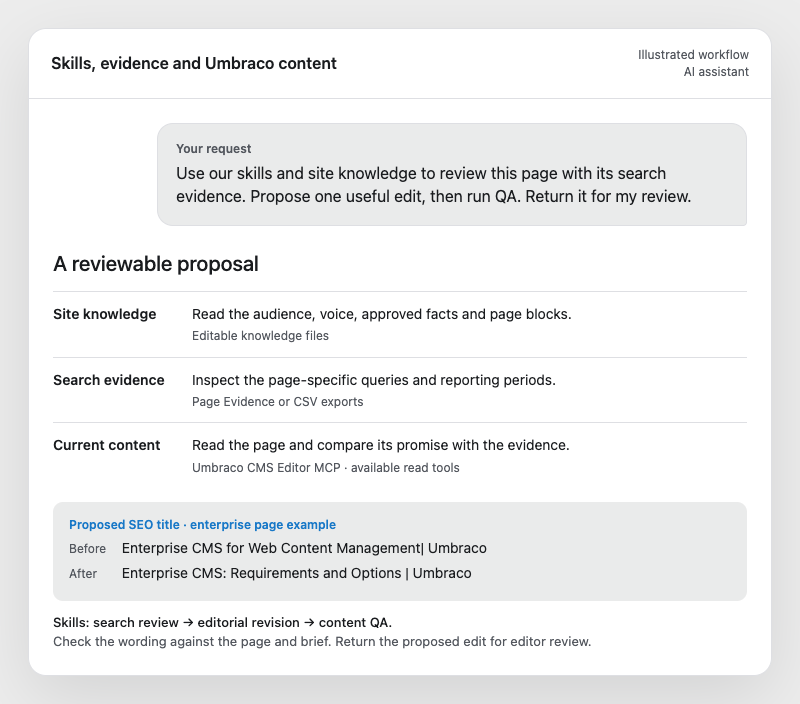
Umbraco’s enterprise CMS page recorded almost 12,000 impressions and 10 clicks in the 30 days to October 1, 2026, at an average position of 6.8. I used Page Evidence to bring the search evidence into the review, then compared it with what the page actually offered.
The page already explained requirements and compared CMS architectures. We tested a title that made that purpose clearer:
- Before: Enterprise CMS for Web Content Management| Umbraco
- After: Enterprise CMS: Requirements and Options | Umbraco
We also revised the meta description. The brief limited that edit to those two fields. It gave the editor something small enough to review and a hypothesis to measure later. Low clicks justified investigating the snippet; they did not prove it was the cause. A hosting FAQ changed that day too, so the later comparison will need to account for both.
Sometimes reading gives you the better brief
My AI marketing workflows article had three clicks in the latest 30-day period. That is a small basis for a grand theory about what Google thinks of your content. Reading it gave me a more useful finding: it described clustering, briefing and QA, but offered less help to someone sitting with a CSV and wondering what to do next.
The brief became: add one worked example with page-specific inputs, review instructions and a proposed edit. That is something an editor can judge. “Improve the SEO” is considerably harder to review.
Add analytics for what happens after arrival
Search Console and on-site analytics answer different questions. Keep their metrics separate even when you review them in the same conversation.
The analytics skill can work with exports from GA4, Matomo or another provider. In measurement.md, record what a row represents, the reporting periods, filters, timezone and definitions of the metrics you want to use.
Be especially clear about outcomes. An event count is not automatically the number of sessions completing an action. A column called “conversions” still needs a definition, however reassuring the heading looks.
Try this request:
Use the analytics page review skill with these exports and measurement notes. Compare the completed periods. Show changes in acquisition, engagement and our defined outcomes, using the dimensions available. Then compare the findings with the GSC investigation and explain the next useful check.
Suppose recorded sessions rise while sessions completing your defined outcome stay flat. Inspect the sources bringing the new traffic, the tracking and the counts before blaming the copy. If the page needs a clearer next step, the content skill can examine that against the actual page.
Neither export establishes which individual search query caused a visit or conversion. The useful result is a measured pattern and a sensible investigation, with the sources still identifiable.
Improve the skills through real work
I would run a task manually before designing a large skill library. Inspect the output and record the corrections you had to make.
If the assistant recommends adding an answer already present, strengthen the instruction to read the whole page and cite the current passage. If it invents a capability, improve the fact register and the source requirement. If it changes the argument while polishing the voice, make preservation of the accepted brief explicit.
Correct the knowledge when a fact is outdated. Correct the skill when the task repeatedly goes wrong. Keeping those separate makes maintenance much easier.
Test on cases where you can judge the answer. Include a page needing no change, an incomplete export and a draft with an unsupported claim. A skill that recommends a rewrite every time has not learned restraint; it has found a reliable way to stay busy.
Review the draft and return to the evidence
Once you accept the change brief, use the revision skill to write the proposed copy. Then use QA to check the whole result against the brief: the page promise, argument, facts and voice.
The practical checks matter too. Open the links and check their destinations. Check that heading levels follow the page structure, that images load and have appropriate alt text, and that copy fits the selected blocks. Where a rendered preview is available, inspect it: a populated image field does not tell you what alt text the page actually emits. Record checks you could not complete so the editor knows what still needs attention.
Keep drafting and publishing as distinct instructions. A CMS draft gives an editor something concrete to inspect; it does not remove the editorial decision.
When a change goes live, record what changed, why, the baseline and the question you will review later. Compare equivalent periods, account for other changes and look at the metrics relevant to the hypothesis.
Start with one page and one task. Give the assistant enough context to make a useful proposal, inspect its reasoning and improve the files from what happens. Keep the instructions that help you get a better draft. The filing cabinet can wait.
Try the skills on your own site
I have made the files available so you can try this on a real page. Both projects are free and open source under the MIT licence:
- Get my Umbraco Editor MCP Skills. Download the twelve skills and eight knowledge templates, tailor the audience and voice files, and give your assistant one job: review a page, prepare a brief or check a draft.
- Try Page Evidence. Use my tool to gather page-specific Search Console evidence and separate analytics evidence when configured. Compare completed periods and choose a page worth investigating, then bring the findings into your skill workflow. The repository includes a demo report and setup instructions.
To work with the content in Umbraco, connect your assistant to the Umbraco CMS Editor MCP. Check the available editor tools for reading pages, inspecting blocks and preparing drafts. What you can use depends on your permissions and the individual build.
You can also start with saved content and CSV exports. Pick one page, try the relevant skill and see whether it helps you make a better editorial decision.
Recommended next
More writing connected by category or shared topics.