A page is losing traffic
Compare equivalent periods and inspect the returned queries for that page. Find the visible movement worth investigating before rewriting the headline.
Page Evidence · Free & open source
Page Evidence helps you investigate traffic changes and new questions in Google Search Console, with separate evidence from your analytics tool.
See what changed before you decide what to edit. Read a local report, or explore the findings with an AI assistant such as Codex.
For people doing hands-on content and SEO work. Runs locally; setup requires a terminal and access to your reporting properties.
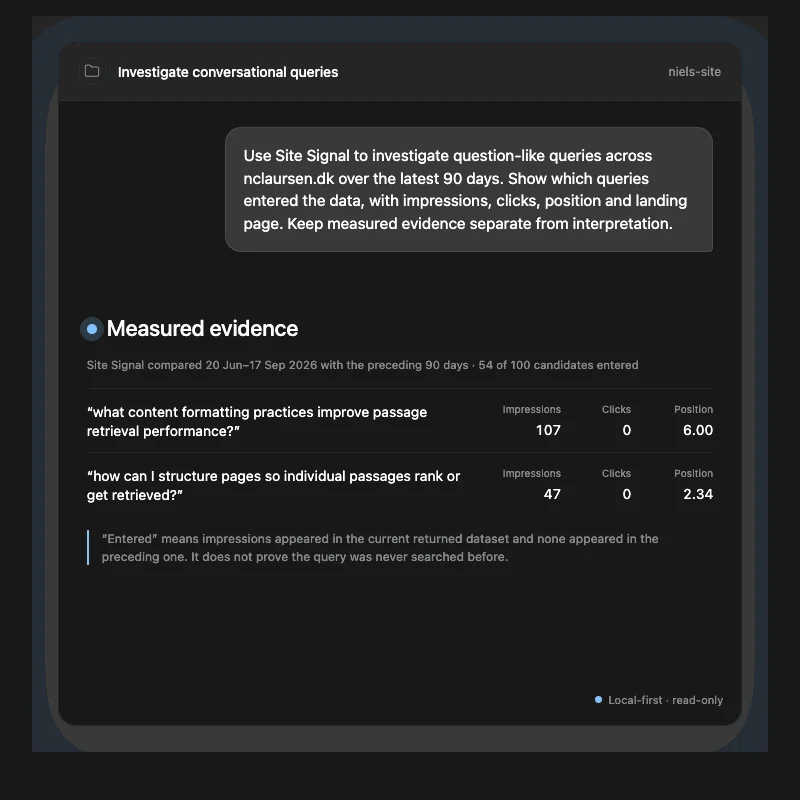
Compare equivalent periods and inspect the returned queries for that page. Find the visible movement worth investigating before rewriting the headline.
Surface question-like queries, including small signals, and see which pages Google returned. With local source access configured, bring the relevant headings and excerpts into the investigation.
Review a short investigation queue with evidence limits alongside each candidate. Record the action you choose and when to review it, including when the right decision is to leave the page alone.
From my own site
On one of my articles, the query “chatgpt prompt” moved from 10 to 3 clicks, 353 to 78 impressions, and average position 11.8 to 19.2 across equivalent periods.
That gives me something specific to inspect: did the visible query mix change, and does the page still answer the intent? I can compare the evidence with the content before choosing an edit, an internal link, or no action.
The movement does not establish the cause. Search Console can also withhold low-volume queries. Page Evidence keeps those limits visible.
Read the story and evidence behind Page Evidence →
You can use Page Evidence from the command line, or connect it to an AI assistant through MCP, the connection that lets the assistant request data from the tool. Page Evidence retrieves the evidence; the assistant helps interpret it; you decide what to change.
Use your Google Search Console property and a supported analytics provider. Credentials, cached data, and reports are stored on your machine.
Compare 30, 60, or 90 days with the preceding equivalent period. Look at search movement and provider-specific analytics evidence separately.
Use the findings to assess what needs attention. Keep an explicit local action log and review the next comparable period.
An example prompt after connecting Page Evidence
“Investigate this page over the last 90 days. Which visible queries changed, what does the analytics evidence show, and what should I check before editing?”
I built this for the awkward gap between a chart moving and someone deciding to rewrite a page. Page Evidence does not identify individual queries as AI Mode traffic or measure your visibility in ChatGPT. It compares completed reporting periods and shows what the returned data supports.
Try it on one site
The repository includes a synthetic demo report you can read without installing anything or connecting an account. It is example data, so you can see the format before bringing your own site.
A local Node.js installation, terminal access, a Search Console property, and your analytics configuration. Google access requires your own Google Cloud OAuth setup. The README covers installation and provider-specific requirements.
Page Evidence fetches reports from your configured providers and stores its working data locally. It uses read-only reporting access and makes no model API calls itself. When you use an AI assistant, evidence returned to that assistant is handled by the client you choose.
Page Evidence is free and open source under the MIT licence. It does not publish content or change your analytics configuration.
Source code and documentation on GitHub →