I Built Page Evidence to Find the Next Content Investigation Worth Running
Filed under Search & AI Discovery
I keep running into the same awkward moment in content work.
Search Console says a page lost clicks. GA4 says engagement changed. The dashboard looks serious. Everyone looks at it for a bit. Then someone asks the question that actually matters:
What should we do next?
The honest answer is usually: not enough to rewrite the page yet.
That is not a satisfying dashboard answer. It is often the correct one.
So I built Page Evidence: a small, open-source command-line tool and local MCP server that turns Google Search Console and GA4 or Matomo data into a short investigation queue.
It does not promise a magic “SEO score”. It does not publish anything. And it does not quietly shovel your analytics into somebody else’s SaaS dashboard. You connect your own properties, and the token, cache, reports, and snapshots stay on your machine.
A new kind of query started appearing
In July 2026, I began seeing unusually specific questions in Search Console. They looked less like conventional keyword searches and more like prompts:
How can I structure pages so individual passages rank or get retrieved?
That query generated 47 impressions at an average position of 2.34 between 30 July and 5 August, with no clicks. Another question about content formatting and passage retrieval generated 107 impressions at an average position of 6 between 15 and 17 July.
The timing was interesting. In early August, other SEOs also began documenting conversational queries and short follow-up responses inside the normal Search Console performance report. Search Engine Roundtable collected several of those observations on 6 August. Google explains that when someone asks a follow-up question in AI Mode, the follow-up is treated as a new query and its impressions, position, and clicks are counted in Search Console. Google documents that behaviour in its explanation of AI Mode metrics.
That does not mean I can label either of my examples as an AI Mode query. Search Console includes AI Mode and AI Overview activity in its general performance reporting, but it does not identify the source of an individual query row. Long and conversational searches also existed before AI Mode. The defensible observation is narrower: a cluster of question-shaped queries entered the returned data, and some of them appeared during the same period in which the wider pattern became visible to other practitioners.
This gave me a concrete reason to extend Page Evidence.
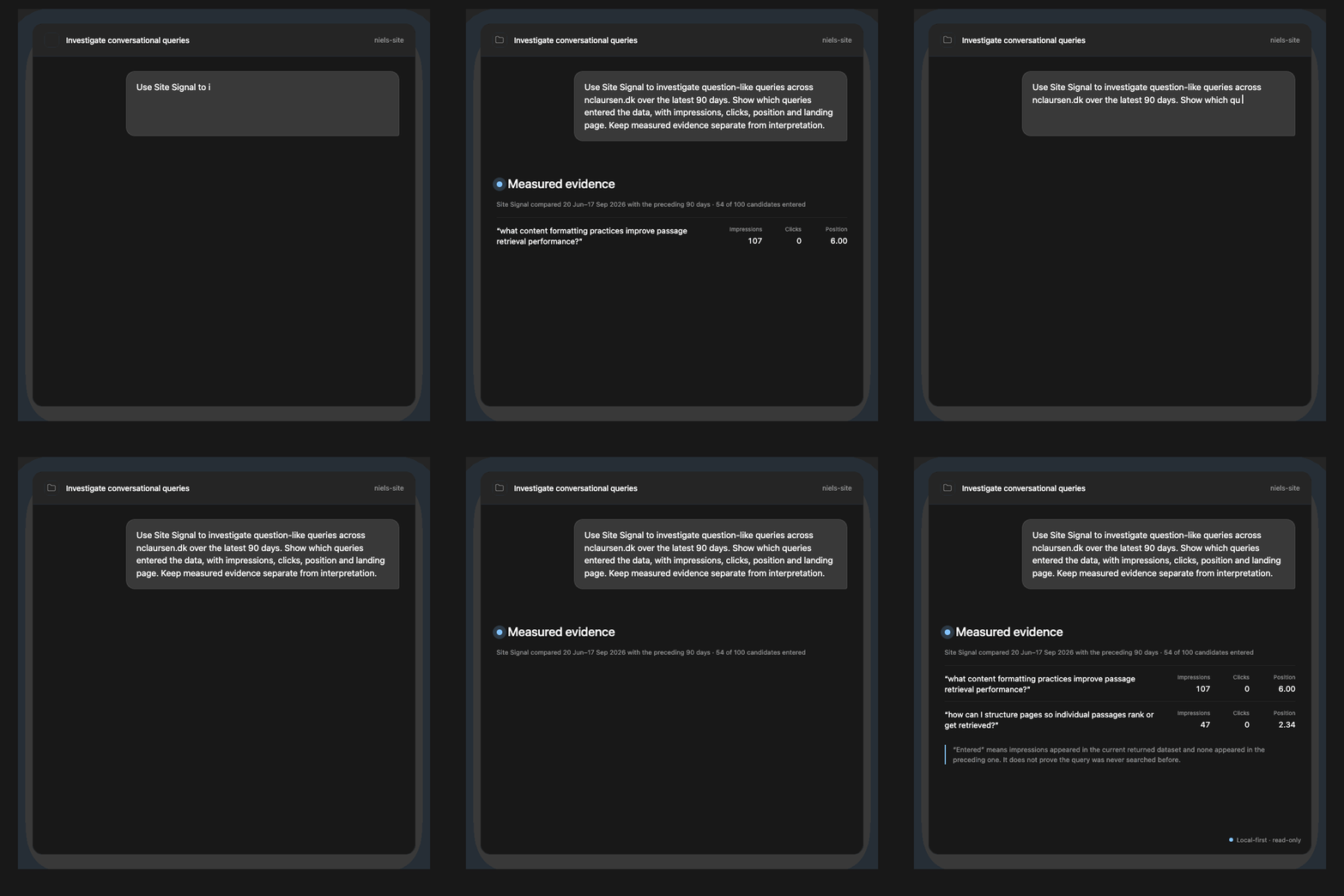
Recorded under the previous name, Site Signal. Page Evidence finds the measured query and page evidence first. The chat client interprets it afterwards.
Page Evidence can now scan the site-wide Search Console query-and-page data for question-like formulations in English and Danish. The workflow deliberately includes small signals, even a single impression with no clicks, and compares equivalent 30-, 60-, or 90-day periods. Each candidate is labelled entered, exited, or retained based on the returned rows.
Entered has a precise, limited meaning: the query had impressions in the current returned dataset and none in the preceding returned dataset. It does not prove that nobody searched it before. Search Console can withhold low-volume queries, and its query rows are not a complete record of demand.
Once I select a candidate, Page Evidence can connect it to the page Google surfaced and return bounded headings and relevant excerpts from the local source, when repository access is configured. Codex can then help me assess whether the answer is already clear, buried in the page, weak, or missing. The MCP returns the evidence; the chat client makes the interpretation; I decide whether the page should change.
If you want to run the underlying process manually, I have described it in Turn Search Console Queries Into an AEO Backlog. Page Evidence automates the retrieval and comparison parts without pretending that every detected question deserves content work.
The dashboard is not the decision
Google Search Console is excellent at showing search performance. GA4 or Matomo can add provider-specific evidence about what happened on the site. The trap is treating them as one clean story.
They are not.
A GSC click is not a GA4 session or a Matomo visit. You cannot attribute a search query to a person, a conversion, or a later page view. High impressions and a low CTR do not automatically mean your title is bad. And a page with three days of data has not “failed”. It has barely arrived at the party.
I still have to actively edit for this when I look at my own data. A metric changing is an observation. A page rewrite is a decision. There should be a bit of evidence between those two things.
What Page Evidence actually does
The default report compares the last 30 complete days with the previous 30, while leaving a short reporting lag at the end. The same investigation can use 60- or 90-day windows when the evidence is sparse. Page Evidence then:
- fetches finalized page-level GSC performance;
- fetches GA4 or Matomo evidence separately, preserving the provider’s own metric names and scope;
- normalizes URLs locally before comparison;
- shows bounded Search Console query examples for a selected page in both periods;
- finds bounded, question-like query-and-page candidates across the site;
- exposes page lifecycle, query entry and exit, segments, and measurement readiness;
- returns optional local headings and excerpts for a selected page or question;
- applies transparent coverage and freshness gates; and
- saves a compact Markdown and JSON report plus an explicit local action and review log.
The output is an investigation queue, not a queue of automatic fixes.
For example, it might flag a page that lost clicks and impressions at enough volume to be worth checking. Your next step is still to inspect the query mix, position, reader intent, and page context. You might update the article. You might add an internal link. You might decide nothing changed that warrants work. All three outcomes are healthier than blindly changing a title because a chart moved down and to the right.

An early report from my own site, recorded under the previous name, Site Signal. The important bit is the wording: these are evidence-backed investigations, not automatic content changes.
From a page decline to the queries that moved
This is the part I wanted most when I built the first version.
If a page lost clicks, you can now inspect up to five Search Console query examples for that page in the current period and the previous period. Page Evidence shows the observed click, impression, and position movement for the returned rows.
That does not turn the API into a complete keyword database. Search Console returns top rows and can withhold low-volume queries. A missing row is new/no baseline, not proof that the query vanished. But it is enough to replace “this page declined” with a more useful question: which visible query theme changed, and does the page still deserve to answer it?
On one of my own articles, that quickly showed the meaningful movement was not a mysterious site-wide event. The query “chatgpt prompt” moved from 10 to 3 clicks, 353 to 78 impressions, and average position 11.8 to 19.2 across equivalent periods. That gives me a specific investigation to run before I touch the page copy.
Why I made it local-first
There are plenty of tools that can collect more SEO data than you will ever have time to interpret. That was not the problem I wanted to solve.
I wanted something small enough to run against one site, private enough to use with real reporting data, and explicit enough that I could hand its output to an AI assistant without turning the prompt into a full-site data dump.
Page Evidence has no cloud database, paid SEO subscription, background model call, or hidden LLM bill. It asks Google only for read-only Search Console and, when GA4 is selected, Analytics access. A Matomo setup uses the configured reporting endpoint and a read-only token. Page Evidence never edits your website, changes an analytics configuration, creates an event, or messages another system.
Think of it as a content preflight check. It tells you which investigations are worth bringing onto the runway. It does not fly the plane for you.

What you can use it for
If you own content, SEO, or growth work, Page Evidence is useful when you need to:
- identify material page-level search changes without filling a backlog with noise;
- surface sparse, question-like queries that would be easy to miss in an ordinary report;
- connect a selected question to the page and available local source content before proposing a change;
- keep search performance and on-page behaviour evidence separate;
- record what you changed, the baseline you used, and when to review it; or
- give Codex a bounded local report to interpret instead of pasting an analytics account into chat.
It is deliberately not a measure of “AI visibility”, total query coverage, or causal impact. I would rather a tool says “insufficient evidence” than produce three generic recommendations to make a report look busy.
Is Page Evidence real time?
No. Page Evidence fetches Search Console and GA4 or Matomo data on demand and compares completed reporting periods. It deliberately leaves a short reporting lag so the newest dates have time to settle before they enter the comparison.
That makes it useful for recurring investigations, not live monitoring. It will not tell you what happened five minutes ago, and I would not trust Search Console data to do that job even if the dashboard had a sufficiently exciting animation.
The practical workflow is to run Page Evidence on a regular schedule, inspect the pages or questions it surfaces, record any action you take, and review the next comparable period. If you need real-time campaign or product monitoring, use a system designed for live event data instead.
Try it on your own site
See Page Evidence in action and find the setup guide. The product page gives you a short walkthrough and a synthetic demo report to inspect before connecting your own data.
Page Evidence is available on GitHub. It includes a synthetic demo report, setup instructions, an MIT licence, and a local stdio MCP mode for Codex or another MCP host.
You bring your own GSC property and either a GA4 property or Matomo setup. The data stays yours.
If you are doing content work from Search Console data, start with one page. Ask what changed. Ask what you can actually infer. Then decide whether the next move is a content edit, an internal link, a distribution test, a measurement fix, or no action at all.
That last option is underrated. It has saved me from a lot of very productive-looking SEO side quests.
Recommended next
More writing connected by category or shared topics.